Friday, May 26, 2006

Handling the Browser 'Refresh' Button

When the user hits the 'refresh' button, the page resends the previous request to the server, which usually results in unexpected behavior* for web applications (*bugs).


One of the difficulties with building Web Applications is the fact that they are hosted within a 'browser'. The browser contains features that allow the user to customize their Internet browsing experience. On this note, it is EXTREMELY annoying when an application attempts to mess around with browser settings, it not threatening (in a securityish sort of way). So, in my opinion, disabling the refresh button is not an option! Besides, the user can always hit ctrl-r to get a browser refresh (and yes you could probably catch ctrl-r with javascript but that's not the point).


Response.Redirect


My current preferred method of dealing with the refresh button is to redirect back to the current page for all data modifying postback events. Something like the following,


Response.Redirect("Model.aspx");

where Model.aspx is the current page. It might not be a great idea to hardcode the page name (in case you want to change it). I've seen code where each page exposes a Url property. In this case the code would look like the following.

Response.Redirect(this.Url);

Placing these redirects in the event handlers ensures that if the user hits 'refresh' immediately after a data changing postback the event will not be re-fired. The refresh merely calls the redirect again (essentially) and reloads the page (as expected! how wonderful and easy too!).


Drawbacks


While the redirect method works, it is not without its difficulties. Remember, it is like a fresh navigation to the page, so it refires your "if( !Page.IsPostBack )" code. This can be a problem. Usually the "!IsPostBack" code populates list controls and re-running this code will cause current selections to be lost (very irritating for the user). Normally the ASP.NET Viewstate mechanism ensures the current selections on list controls are maintained through postbacks. My solution to the list selection problem is to store the current selection in Session and set the list selection manually.


Besides the extra management of Session variables, there is also the performance issue to consider. Each postback is now causing 2 hits to the server. Potentially calling into the database for data already displayed on the page. This seems like a high price to pay to deal with the 'refresh' button. Output caching may be a solution here...

Friday, May 19, 2006

Cost of Calling Methods in C#

What does a method call cost in C#? Should I use temps to reduce method calls?


In university, so many years ago, we learned that one of the most performance intensive operations was the method call. The professor explained the work required to create a stack frame, and move values into it, etc. Well... that was then, when maybe compilers weren't quite so efficient. Is this still true? What is the overhead when calling a method with a modern language like C#?


Why do I care about this?


Martin Fowler in his book Refactoring: Improving the Design of Existing Code, (which I am currently re-reading) describes several method creation refactorings, one of which is driven by the desire to remove temporary variables from a method (Replace Temp with Query). The motivation behind this refactoring is based on the idea that temporary variables encourage large methods and make refactoring difficult. Upon reading this refactoring I recalled the university lecture where we discussed the cost of calling methods and use of the C++ inline keyword (inline is a C++ compiler hint to not actually create a function and call it, but to generate inline code instead). In C++ 'inline' exists because function calls can be expensive. So I created a simple test to measure the overhead with method calls.


Method Call Overhead Results


Here is the code I wrote to measure the method call overhead, one method that simply does a calculation inline, and another that calls a function to do the calculation.


public class MethodCallCost
{
private int _iterations;
private int _valueA;
private int _valueB;

public MethodCallCost(int iterations, int valueA, int valueB)
{
_iterations = iterations;
_valueA = valueA;
_valueB = valueB;
}
public void MethodCall()
{
double temp = 0;
for( int i = 1; i < _iterations; i++ )
{
temp = CalculateAmount(_valueA, _valueB, i);
}
}
private double CalculateAmount(int valueA, int valueB, int divisor)
{
int result = valueA * valueB / divisor;
return result;
}
public void Inline()
{
double temp = 0;
for( int i = 1; i < _iterations; i++ )
{
temp = _valueA * _valueB / i;
}
}
}


I created the MethodCallCost object to run 3,000,000 iterations. Here are some results,


Method Call (Ms)Inline (Ms)
9347
11047
9363
9462
9462
9447
9462
9447
10963
7862

So, my conclusion (with this simple and perhaps insufficient test) is that method calls are cheap. The benefits of the 'Replace Temp with Query' are probably worth it. Now of course you may have a complex method that calls a webservice, or into a database, and in that case of course it probably makes sense the store the result instead of requerying. There are still judgement calls to be made, but go ahead and create method calls, just remember to profile and tune.

Tuesday, May 16, 2006

UrlReferrer - Handle with Care

What page was the user on before this one? Hey! Reponse.UrlReferrer seems to have that information.


Ok, I'll admit I'm a little scared of this feature. It seems to undermine the atomicity of web requests. If I could trust it though, UrlReferrer would be extremely handy for a web app with sophisticated navigation. Imagine multiple ways to get to a screen (as any good app should allow), and the user hits the 'cancel' button, and magically is returned to the previous screen. After all, the user's natural expectation is to be returned to the screen they were just on isn't it?. Here's some code that does just that.


private void btnCancel_Click(object sender, System.EventArgs e)
{
if(Request.UrlReferrer != null)
Response.Redirect(Request.UrlReferrer.AbsoluteUri);
else
Response.Redirect("Dashboard.aspx");
}


This code ensures that the UrlReferrer HTTP Header is set, and if it is redirects the browser to the referrer page. Otherwise the user is sent to a default page. Note here, NUnitAsp doesn't set the UrlReferrer header hence my null check. But...


Postbacks


If the page posts back, the Url Referrer is set to the current page, and your navigation is now broken. You either have to store the referrer in the page load event for later use, or not put any postbacks in the page (danger! danger! you will probably forget about this and break your redirection). I don't know about you, but my pages post back a lot especially in their immature state.


Server.Transfer


You can't use Reponse.Redirect to navigat to pages that reference the UrlReferrer. Reponse.Redirect causes the browser to send a GET request for the new page. The subsequent requests, such a POST to go to another page, now have the Url Referrer of the current page because of the GET request made by Response.Redirect (or something like that, trace the packets and you'll see what I mean).


The more I write about it, the more convinced I am to avoid Url.Referrer. The design limitations to 'make it work' are extremely constraining and easy to forget. It doesn't work with NUNitAsp (important for me, anyway). I am also unsure of which browsers even support this header.


Alternatives


You can potentially change your navigation strategy and use the bread crumb trail approach. Just save a navigation tree in the user's Session. I have also had some success passing navigation information as URL Query parameters (I.e. page.aspx?PreviousPage=Main.aspx). UrlReferrer is a fragile construct, try to find another way.

Friday, May 12, 2006

Protected or Private?

As of late, I've been setting the access level on class properties to protected.


I was creating a class, and the protected keyword came up in intellisense and I paused to think. Maybe if a class inherits from this class it would be useful to have access to the member data of the class, the same goes for private methods, why not make them protected?


So, right now, I am generally going with 'protected' for all internal class stuff. Classes that I know will not be extended will have private members, I ensure to seal those classes.


I imagine that a truly carefully designed class has a mix of private, protected and public access levels, and that setting everything internal to 'protected' is a bit naive. but for now...

Wednesday, May 10, 2006

OleDbCommand Parameters - Order Matters

Having trouble with your MS Access Update statement? Check your parameter order.


So I've written a small parameterized Update statement to create an OleDbCommand.
I was surprised to find that my Update command was returning 0 rows updated. Everything looks fine on inspection, so I pull the command into MS Access and replace the parameters with the specified values and it works fine. My code looks like this,


string sql = "UPDATE tblMemberVehicle SET MemberId=@MemberId, VehicleTypeId=@VehicleTypeId, Identifier=@Identifier WHERE Id=@Id";

OleDbCommand dbCommand = new OleDbCommand(sql, conn );

dbCommand.Parameters.Add("@Id", OleDbType.Integer).Value = vehicle.Id;

dbCommand.Parameters.Add("@MemberId", OleDbType.Integer).Value = vehicle.User.Id;

dbCommand.Parameters.Add("@VehicleTypeId", OleDbType.Integer).Value = vehicle.VehicleType.Id;

dbCommand.Parameters.Add("@Identifier", OleDbType.VarChar).Value = vehicle.Identifier;

Parameter names all match nicely, no exceptions from the database. I check the rows updated after running my ExecuteNonQuery statement, and always - 0 rows updated.


I have another update statement which is working, so I take a quick look at it. Lo and behold, the @Id was the last parameter added, and it corresponds with the parameter order as it appears in the SQL statement. Could it be that OleDbCommand works just like OdbcCommand and requires parameters specified in the SQL specified order? I begin to suspect that the parameter names are actually meaningless and conduct a small experiment. I change the parameter names to nonsensical names and leave the sql parameter names alone.


string sql = "UPDATE tblMemberVehicle SET MemberId=@MemberId, VehicleTypeId=@VehicleTypeId, Identifier=@Identifier WHERE Id=@Id";

OleDbCommand dbCommand = new OleDbCommand(sql, conn );

dbCommand.Parameters.Add("@Foo", OleDbType.Integer).Value = vehicle.User.Id;

dbCommand.Parameters.Add("@Bar", OleDbType.Integer).Value = vehicle.VehicleType.Id;

dbCommand.Parameters.Add("@Try", OleDbType.VarChar).Value = vehicle.Identifier;

dbCommand.Parameters.Add("@This", OleDbType.Integer).Value = vehicle.Id;

Any guesses as to what happens? Surprise, surprise, this code works. The parameter names are truly meaningless, well against MS Access anyway. I believe SQL Server respects these parameter names and actually uses them.


And all this time I've been sooo careful about my parameter names, sigh.

Monday, May 08, 2006

Returning Null Objects

What does it 'mean' when a method call returns a Null object?


I believe you must define interfaces very carefully. Firstly, because once an interface is in use it is difficult to change later. Second, because every method name, parameter, output is part of the description of what the interface does. The interface 'expresses' a mental model to the developer using it. It explains how the library works, or presents a mental model that can be used to apply the library effectively. The interface tells the developer how the library 'works', so while the code only deals with inputs and outputs, we developers use interface I/O to fabricate an understanding of what's happening under the covers. It is therefore important to specify an interface carefully. So, with that in mind, I propose a few instances where it makes sense to return a Null object from a method.


Errors


If you are not using exceptions to relay errors, or unexpected system conditions, and you are instead setting a global or passed-in error structure, your method should return a Null object reference. You don't want the processing to continue as if nothing was wrong. In the case of an error, the application should proceed into recovery mode. Oh look, I got a Null, something bad must have happened. I can either check the error structure and avoid using the Null object, or I can ignore the error structure and get an Null Object exception (No! Bad programmer!).


Object not found


In many cases I have returned Null from a 'find' or 'get' method when it was unable to retrieve a requested object. While it is necessary to check the return value for Null in these cases, the implementation is simple. A Null object is sometimes even acceptable, as it forms an input to another method which allows a null parameter. I am still in favor of this use of Null object references. After all the database supports the concept of Null too.


Null Object Pattern


The Null Object Pattern entails essentially 'stubbing' out methods and creating an indistiguishable object from the real object. The client object can use the Null object as it would the real thing, and no unpleasant Null checks are required.
I believe the Null Object Pattern is only useful for stubbing out code, where the object's behavior is not important to the client object. Maybe I can stub out the application logging object for example. If I haven't configured my logging, the logging system returns a Null logging object that doesn't fail on the log call, but does nothing. I can't however, stub out the Math object from which I am expecting performance of important calculations. It seems that I would be at risk of introducing difficult to find bugs, I would rather get an 'object reference not set' exception than a series of zeroes displayed in a report.


Empty List or Null


If my method returns a list of objects, and there are no objects to return, it makes sense to me to return an empty list. See Tor Norbye's blog post on this. You certainly can't return either Null or empty list and ascribe the same meaning to both, they're two different things. Empty list is easy, no objects found. Null? That just means an error to me, like the object wasn't properly initialized or something.

Tuesday, May 02, 2006

Repository Create Pattern

I'm working on creating a new object creation pattern. This new pattern is an elegant solution that fits within the Repository pattern described in Domain Driven Development by Eric Evans. I'm trying to ensure the following constraints in my application,


  • Objects are valid at all times

  • An Entity object without an identifier (db key) is invalid

  • Don't want to have to use GUIDs as identifiers

  • Objects that cannot be saved (because of their state) are invalid


Essentially, if an object exists I must be able to save it without getting constraint errors from the database.


Introducing 'Repository Create'


The Repository Create pattern works a lot like the factory patterns. You create objects through the repository. 'Entity' objects (objects that must be persisted) must all be created by a repository. That repository ensures uniqueness of business keys (if there are any) and applies an id to the new object. Any errors creating this new object and 'no object for you!'. The application never has partially formed, or duplicate objects floating around.


What about updates? Model objects should not permit updating of their keys. Simple. But what if I modify a property and thus make it a duplicate? You shouldn't be able to do this. Properties that are part of the uniqueness constraint must be modified through the repository, by a repository Update method.

An Example


Let's say I'm writing a project management application and I have a 'Project' object. The Project object must have a unique name so users can identify it, but that name can change too.


I simply create my project objects by calling 'create' and passing the project name to my project repository.

Project p = projectRepository.Create("Project 1");
If the name Project 1 is a duplicate I get an exception from the repository. If not, I get a new Project object, with a valid database Id and I am assured the name is not duplicated. Updating the name would look something like this
pRep.Update(p, "Project One");
Access to the project name has to be restricted either by using the C# internal keyword or Interface casting* (*A slippery way to implement 'friends' in C#).


This is the Repository Create pattern in a nutshell. It seems to be working fairly well so far, of course my requirements have also been fairly simple and I haven't had to do much optimization. More to come on this pattern...

Sunday, April 30, 2006

Apply a Default Sort Order

Always sort your object lists


I tend to get pretty lazy with my coding sometimes. My TODOs occasionally require more typing than it would take to actually do the TODO (I sometimes get lazy with the thinking part). So why would I recommend* (*insist on) sorting every list of objects in your system? Two reasons.


  • It makes testing a whole lot easier

  • You're less likely to have an unsorted list of items appear in your GUI


I have only just started doing this with my code* (* I may post a more educated and experienced blog later which includes the phrase 'it depends' when talking about when to sort lists) and it seems to be paying of so far.


Writing Tests on Sorted Lists


In the past I would put together a small 'IsInList' method to test that an object was in a list. Or I would create a 'GetObjectInList' to get an object and test it for expected values. The fact that the objects were stored in a random order of course made this necessary. The unsorted nature of the lists also meant the search had to be sequential which seemed amateurish (the performance implications were negligible since the lists were tiny, but...).

In any event, the nice thing about using a database is the ease of adding sorting. With a simple ORDER BY in MS Access I can sort on any column ascending or descending. Very little code. The .Net Framework also provides some simple and powerful ways to sort lists. Sorting my lists makes testing easier since object location is predictable. Testing is all about ensuring predictability anyway, right?


Your GUI lists should have default sort orders


If you have object lists and a GUI, you probably have list controls. I'll bet users are expecting data in those lists to be sorted either according to a scheme of their choosing, or in a commonly expected order. Ah, but if you use a layered design* (*like most kind-hearted developers) the question here becomes... where should sort logic exist? In the presentation layer or in the business model? I prefer a thin* (*super thin) presentation layer, the only code in the presentation layer should deal with form and page controls. I suggest then, that sorting objects is the responsibility of the model and is a business rule. Sorting is part of the analysis of data, like calculations. Testing logic in the GUI is also more difficult, so move as much logic as possible into to the model layer. If you are consciously sorting your object lists and your tests are checking this, there is very little chance of a nasty unsorted list control bug appearing in your gui (this happened to me once, and was caught by a customer! egad.)


The .Net Framework offers some powerful sorting tools namely the IComparable interface, and Comparer objects. These two tools give you unlimited sorting power, easily and elegantly.

Monday, April 24, 2006

ASP.Net Timeout

HTTPUnhandledException: Request Timed Out.


Every now and then, when a request had a lot of work to do, I would get this exception. It didn't 'ripple up' from a method in the regular way that an exception does. It just caused execution to cease and was caught by the default error handler. There are a few places where timeouts are set. One is in IIS. In the Web Site properties there is a setting called 'connection timeout'. I thought this might be the candidate. So I increased the timeout, but no luck. The operation causing the timeout was an data integration over a network. The integration API had a connection timeout setting too. Changing this timeout had no effect.


Another strange behavior was that in debug mode the problem went away. The operation would complete without the time out. Sadly, I had to debug the problem in release mode, with many symbol files missing. At around the same amount of time I would get an 'ObjectDisposedException' on my NetworkStream object, followed by a ThreadAborted exception.


Turkey Trails


I found some threads online about the .Net garbage collector prematurely destroying objects if it thought they were out of scope (or might as well be since there were no subsequent references to them). So I daftly started adding Garbage Collector control statements to my code to preserve my objects. Of course this just 'felt' wrong, but hey, desparate times... Well of course no luck.


Day 2


It always helps to be fresh, and to bring in a fresh perspective. So, with the help of a coworker we clarified 2 important clues.


  • Something is terminating the worker thread

  • The thread is terminated after 90 seconds


There was definitely a timeout somewhere which was bringing everything to a halt. I already knew it wasn't the IIS connection timeout, but what about this ASP Script timeout under virtual directory configuration? It was set to 90 seconds too! Alas, it was not the culprit. Which of course made sense after I tested it, but ya never know.


The Almighty Interweb


How did I code before the Internet? (Yes I am that old). Some Googling later I discovered, da na na naah! An obscure, yet highly important setting in machine.config. Something that ASP.Net uses to terminate threads. Something that is defaulted to 90 seconds. The answer, the culprit! A glorious little piece of XML.


ExecutionTimeout


Allow me to introduce executionTimeout. It looks like this,

<configuration>
<system.web>
<httpRuntime executionTimeout="90"/>
</configuration>
</system.web>

It is set to 90 seconds in machine.config, and does not appear in the default web.config file that VS.NET creates for Web Applications. Every ASP.NET developer should be aware of this setting. Why is it kept hidden away? Ahhh, the eternal mysteries... Anyhow, there it is. Add it to your web.config. Pass it on.

Thursday, April 20, 2006

ToString()

What should I do with ToString()?


In the Microsoft .Net Framework, ToString is defined in Object and is therefore ubiquitous (and everywhere too). You have the chance to override ToString whenever you want. But if you're thinking 'hmm... I don't override tostring() very much', then I would suggest maybe it's time to start. It certainly is handy to call whenever you need to output an error message. I almost just expect it to work (but nothing in life is free). Just call ToString() on your object and add to your trace messages. Very nice, but for the fact that error log messages aren't the only possible use for ToString(). Alas, with such a ubiquitous method, come multitudinous options for usage. Int.ToString() is an example of the obvious and straightforward, but what do you with an object with multiple properties and subobjects, and inheritences and so forth?


Proposed Behavior


I like the idea of ToString() displaying object identity. If you work with objects that model something real, like a business concept then output information that identifies the object. Not the internal key or database id, but the natural key. The data that people undestand to represent the essence of the thing. For instance, if your object represents a customer, ToString() would return the customer's name. Return a string that would be identifiable to a user using your software. Take a look at how DateTime.ToString() works, it is a good, simple model. The default ToString() returns the date as a string formatted according to the current thread culture. It displays the date in a way that I can read it. DateTime.ToString() takes the various members (day, month, year etc.) of DateTime and assembles them into a reasonably formatted presentation. Most objects have a 'name' property or a similar identifier. This is what ToString() should output. Converting an Address object with ToString() would probably output the address as it would be written on a letter.


Complex Objects


What about something like a Report object? Should ToString() return the report content as a properly formatted string? I would suggest that this kind of behavior is beyond the intent of ToString(). I would be inclined to only output details that again, identify the report, like its title, run date, and so on, not the content of the report. This should be left to specialized methods that can be expanded to more flexible use. Output a string that would would be written on a file folder tab. The content is in the folder, ToString is the human readable index. The information you would need use to retrieve the object.


Format Providers


Now it gets complicated (well, more complicated for me). What about customizing the output of ToString()? Back to my favorite, DateTime. People want to see dates in all sorts of different ways. DateTime.ToString() solves this by taking an optional IFormatProvider to display dates according to cultural preferences. Exposing ToString() with parameters is a good way to provide extra control over formatting. Again it still only outputs identity, just in a different format.


I am starting to implement the base ToString() on every class I write, and it is very convenient. I truly dislike seeing the Namespace.classname output when I call ToString(), very annoying in my view. Implement ToString and make users of your code happy (including yourself).

Monday, April 17, 2006

Elegance is Not Optional

I have an old book (1994) on Prolog called The Craft of Prolog written by Richard A. O'keefe (MIT Press). One of the crucial 'values' of the book is that "Elegance in Not Optional". I find this to be a very striking statement, as I have always felt that design suffered under the realities of practical use. Application performance always seems to ruin a program. It may be that Prolog, because it runs in a isolated workspace has the pleasure of elegance. There are no nasty operating systems or databases to deal with. Yet, I am still drawn to this vision, I want to believe. I have added a small quotation from the text.


Elegance is not optional (1)


What do I mean by that? I mean that in Prolog, as in most halfway decent programming languages, there is no tension between writing a beautiful program and writing an efficient program. If your Prolog code is ugly, the chances are that you either don't understand your problem or you don't understand your programming language, and in neither case does your code stand much chance of being efficient. In order to ensure that your program is efficient, you need to know what it is doing, and if your code is ugly, you will find it hard to analyse. (The Craft of Prolog, Richard A. O'keefe, MIT Press 1994)


I believe that a developer should strive for readability first and foremost. Most of the guidance in Code Complete (Steve McConnell, Microsoft Press) is aimed at improving code readability. I would even go so far as to say readability first, function second. You can always debug a readable program and make it right. But a mess of code that works might as well not exist since any changes to it probably mean rewriting it anyway.


Readability is About Design


Comments, documents, unit tests, all of these things merely support readability and understandability. In the way that a textbook supports a professor. The professor must still be able to teach and must stand on their own with or without the text to be truly effective. Such is also true with code. It should make sense without the supporting pieces, since so often these pieces fall into disrepair. Code is never 100% covered by tests. Comments are usually sparse, out of date or poorly written, as with documentation. The organization and naming in the code must point to its intent and function. The code expresses the solution, it doesn't just implement it. This should be the developers prime concern, express the problem and its solution with the program itself.


Elegant Design


What is elegance? Have you ever heard the expression 'Form follows function'? Everything in the system must have a good reason for being there. Nothing is superfluous, there is no programmer ego, or 'interesting' technology, or 'feats' in the code. The code should read like a well written technical document. Step by step to a predicatible ending. Detail at each level is consistent, methods and data are grouped logically. Nothing is out of place or mysterious. Design also subscribes to the expression 'Function follows form' whereby choosing an elegant form results in a superior design. This implies an intuitive element to coding where you can't just apply rules and refactorings. If it looks good it probably is good.


If you understand the problem, you should be able to look at the solution and say ahhh... yes, I see.

Sunday, April 16, 2006

Exceptions vs Returns Codes - Performance Implications

I am working on inventing or finding a satisfactory validation strategy for my .Net web applications. The final model must appease the following criteria,


  • I must be able to validate the entire screen in one shot.

  • There must be no duplicated code.

  • Objects in the system must always be 'valid'.

  • I want to use as much C# as possible, and minimize javascript


I must be able to validate the entire screen in one shot


This is purely a usability concern. Who wants to go through one error at a time on a page? Fix this, now fix that, opps... this one too. Oh, that would be a duplicate, you'll have to come back later. I think the system should be able to point out all problems immediately.


There must be no duplicated code


I don't want to maintain two sets (or more) of validation code. As in, validation objects on the page, and validations in the model layer. This requirement is in conflict with the other two, which makes my demands demanding.


Objects in the system must always be valid


I don't like the idea of an object being somehow malformed or incomplete. A situation where I have to check an object before I do anything seems to contradict my understanding of encapsulation. An object that starts throwing errors because it is invalid contradicts the very reason for using objects. Which is, keeping things simple. This requirement conflicts with requirement 2 because now you can't just take the validations out of the object, to ensure validity the object has to do validation.


I want to use as much C# as possible, and minimize javascript


I like C#. Visual Studio is an excellent IDE for coding in C#. C# is strongly typed and Object Oriented and is a fine language all aroung. I do not like Javascript. It is not strongly typed, and not really Object Oriented. Javascript is difficult to debug and VERY browser specific. The end.


The requirements may be asking for too much, but I feel that there is somehow a way to satisfy them all, and still have a fairly elegant solution.


Back to Performance


So, I am currently comparing validation through exceptions against the more traditional (pre OO) return codes. My first test is performance. I have read much on the Internet regarding the poor performance of exceptions so I wanted to see it for myself and get some hard numbers. The evidence indicates that Exceptions are slower (Using 1.1 of the .Net Framework). Slower by about 100%!


The Tests


The tests were fairly simple. I created an class whose constructor took 2 arguments, a string and an integer. If the string was null, or empty that was a validation error. If the int wasn't between 0 and 100 that was an error. The exceptions method just threw the various 'Argument' exceptions provided by the framework and filled in a nice descriptive error message which was passed to Debug.WriteLine. The Return code method was more difficult to code and even required a trip through the debugger (Remember, I am a bit daft after all). I had to pass an error object into the class constructor so I could get the same amount of information about the validation errors. Foolishly I declared this object as a 'struct' which meant it was being copied to the stack and thrown away, with all my error information too!


The Results


My test tried to create an object with a problem that would be caught with each of the validations. This code was run in a 10,000 iteration loop, with DebugView (sysinternals.com) open to verify the output. Here are the numbers (ms) I got for 8 runs


ExceptionsReturn Codes
9,1575,234
9,9535,204
9,2475,235
10,4695,360
10,2045,484
10,2034,734
10,8754,610
10,8435,156

I can't account for why the exceptions test speed slowed down. It would probably be worth looking into. The tests were extremely quick to run considering they were attempting to create 30,000 objects each. I was amazed that so many exceptions could be handled in 10 seconds. So, while the exceptions method is much quicker to code and debug, the return codes method is the clear winner when it comes to performance.

Thursday, April 13, 2006

Config File Mayhem

There are config files all over the place!


I don't know if you've ever gotten stuck in the config file swamp, but I'm there now and it is stiiinnkkkeeee! Each Project in my VS2005 solution has a config file. There is one for the Unit Test case project, one for the web app (web.config), and now I've just added one for the Console App. Part of the reason for all of these config files is the fact that all the projects rely on the model library. You know, the library that does all the work.

Notice in the spiffy diagram, how the model library depends on each config file. This creates what I would call 'tight coupling' between layers of the application. The model layer loses resuability and independence. A sort of 'indirect cohesion' between the subsystems through the config file.


My first thought is to refactor the code to move the dependency on the config file up to the 'owners'. The configs are after all owned by these assemblies, so it makes sense for those assemblies to have exclusive interaction with the config files.

So, by the diagram, all interaction with the config file would be up to the config file owners. Settings would then have to be passed into the model as parameters. If this creates a long parameter list, I could group settings into structures.


As usual, foreseeing such problems is always beyond me and it will probably take me some time to work this out to my satisfaction. More postings on this to come :)

Tuesday, April 11, 2006

Creativity and TDD

I just finished reading a blog post on creativity and speed (Posted to the only blog I actually read regularly) which made me think about Test Driven Development as a creativity booster. Kent Beck describes the TDD cycle as


  • Write a test

  • Make it run

  • Make it right


Step 2 is what intrigues me. He suggests "Quickly getting that bar to go green dominates everything else." (Test Driven Development By Example, Ken Beck, p. 11). "Quick green excuses all sins". I believe Kent's intent here is to keep up development momentum, to be driven by the tests. Moving quicky ensures focus and doing only what is necessary, the point is to ensure that you only write code to satisfy the test. However, Kathy Sierra's post made me realize there is another (perhaps unintentional) outcome from being test driven.


I have discovered an interesting side-effect to being Test Driven - creativity. Making that test pass, quickly, stimulates creativity. I've noticed that during the frantic push to green my mind races for options and crazy (Hackery for sure) solutions to make the test pass. The feeling of 'How can I make this pass, quick! you only have 10 minutes! Time! Time!' is a very invigorating, demanding process, and super-rewarding when that test goes green. Of course, once the test passes, I'm usually left with a horrible, disorganized, non-optimal mess. But I've usually learned something new, or done something creative with what I already know. This is completely consistent with the creativity/speed theory however. Creative thought comes from the messy part of the mind and its not going to be clean coming out. Worse yet, trying to create 'clean' kills ideas. You've gotta get those ideas out and down. Don't think, just go! Get that test to pass then you can clean it up later (refactor).


Refactoring of course satisifies the right side of the brain, where you get a chance to be calm and analytical. Creating organization and collecting tasks, and related concepts. Giving proper names to objects etc. I think this mental flip-flop, left-right activity is what makes TDD appealling to use. The brain is fully utilized with TDD, creativity is allowed to prosper without compromising quality. This may explain why Test Driven developers can't imagine coding any other way.

Thursday, April 06, 2006

ADO.NET OLEDB Syntax Errors

I have a large MS Access Sql Script that creates my Access database. I need to run it programatically to create databases on the fly. So I've created a C# application that reads each line of the file and applies the SQL against the database. However, whenever I use the OleDb data provider I get syntax errors. The following SQL for example causes a 'CREATE TABLE' syntax error.

CREATE TABLE Action (
Id INTEGER NOT NULL,
ActionTypeId INTEGER NOT NULL,
Name TEXT(50) NOT NULL,
Description TEXT(255) NULL,
ParentId INTEGER NULL,
SortOrder TEXT(255) NULL,
Tooltip TEXT(255) NULL,
RequiredLicense INTEGER NULL,
OptionalLicense INTEGER NULL,
TableItem TEXT(50) NULL,
SystemPrefEnabled TEXT(255) NULL,
PRIMARY KEY (Id)
)

If I paste this SQL into Access it runs sucessfully. Hmm... I cut down the statement to create a table with only the first column, still fails. So I change the name 'Action' to 'tblAction' and the statement executes without error and creates my table with the name 'tblAction'. So it would seem that 'Action' is some kind of important or reserved word. But why does it work from a SQL window in MS Access? I do not know.


I was about to give up on this and change careers, when I thought I would try connecting to my access database through ODBC. Well, it's been a while since I've used ODBC, but the syntax is pretty much the same so the change is easy. I found a good connection string at www.connectionstrings.com and voila! My entire SQL script runs without error. What!?

I would dig into this and understand why my SQL runs in some cases and not others, but alas, I am already late on this deliverable...

Wednesday, April 05, 2006

ExecuteNonQuery?

I create an Insert query string and pass that into my command 'CommandText' property, and then I call 'ExecuteNonQuery'? NonQuery? Shouldn't that be 'ExecuteQuery'?

But wait, if I set my CommandType to StoredProcedure, then I guess I'm not executing a query. Why wouldn't I call ExecuteStoredProcedure? Well I suppose MS Access doesn't support Stored Procedures.

But hold on, my command object is a SqlCommand object not an OleDbCommand object. Hmmm... so mysterious...

Sunday, April 02, 2006

Aggregate or Association?

Ever since reading Domain Driven Design by Eric Evans, I have been obsessively object modelling every application I write. I am surprised to find that I can hardly ever use aggregation (although I think I should be modelling aggregates). My limited use of aggregates comes from my inability to follow the Aggregation rules, which are,


  • Objects whose lifecycle are tied to another object indicate a possible aggregate relationship

  • Objects outside of the aggregate cannot hold references to objects inside the aggregate, only the aggregate 'root' is referenceable

  • The Aggregate is resposible for ensuring invariants (consistency and integrity) within the aggregation


Domain Driven Design encourages 'Aggregate Boundaries', which means classes outside of the aggregate do not hold references to objects within the boundary. Eric Evans suggests that "Transient references to internal members can be passed out for use within a single operation only." (P. 129), which I imagine means convenience access for one-off operations, but no persisted references.


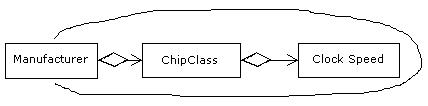
My aggregate issue tends to crop up whenever I have relationships between objects that validate combinations for proper construction of another object (Does this make any sense?). An example is required to explain here. Take the following diagram,

Imagine an application designed to help people configure and purchase PCs. This application restricts the Processors that can be included in a PC by displaying and allowing the user to only select valid processors for a chosen manufacturer. The system wouldn't allow you to select an "Intel Athlon 50Mhz", because such a chip doesn't exist. Manufacturers produce certain classes of chips which in turn run at certain clock speeds. I believe this is an aggregate relationship since If I delete a manufacturer from the system, all the related chip classes should be removed as they cannot be shared across manufacturers. The model seems to support the requirements.


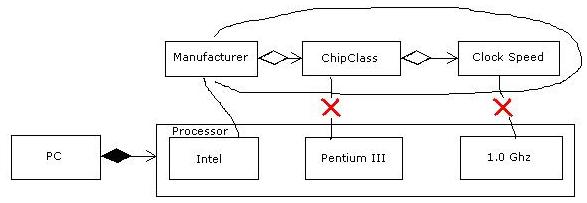
However, the problem comes when I have an actual instance of a PC with a selected Chip. I want the Chip object to have a specified manufacturer, class and clock speed, which are a valid combination and are references to these objects in the system (I.e. if I change a chip class name it should be applied to every PC that has it selected). Connecting my PC object to a Chip object and a Clock speed violates the aggregate boundaries. See the following "UML" diagram, which demonstrates this violation.

I have now run into this problem on 3 of the real world applications I have Domain Modeled. My suspicion is that my concepts are not quite modelled correctly, or that perhaps my aggregate is not really an aggregate. In any case, I have left the relationships as simple associations which I feel doesn't completely express the domain.

Thursday, March 30, 2006

Multiply Loaded .Net Assemblies

I have a .Net web application that seems to use an inordinate* (*Outrageously high) amount of server memory. So, using Process Explorer which I downloaded from SysInternals I examined the ASP.Net worker process (aspnet_wp.exe) and displayed loaded dlls and noticed most of the assemblies in my application are loaded multiple times, which probably explains the memory usage.


As usual I have no cure, just a frightening diagnosis. So I did some exploring on the Inter-Web* (*My name for the WWW) and found Shawn Farkas Blog on .Net Security and an article on how Security evidence will cause an assembly to load for each evidence set. Of course I am left confused, as my .Net security knowledge is weak.


I have also heard that thread culture settings will also cause assemblies to load multiple times, but I have not confirmed this behavior.


My quest is now to understand this behavior, and hopefully rectify it.

Wednesday, March 29, 2006

Upgrading NUnitAsp to .Net Framework 2.0

I want to use NUnitAsp with my VS 2005 Web Projects. So I added a reference to the 1.1 framework compiled version in my Test Suite project. But the NUnit GUI doesn't find my tests? The code compiles however. I suspect it may be possible to mix code from different framework versions, but perhaps I need to look at my .Net architecture books again. Anyhow, I thought perhaps mixing versions doesn't work so I proceeded to convert NUnitAsp to version 2.0. Of Course NUnitAsp has references to 1.1 libraries (NUnit.Framework for example). So I also updated these references to point to 2.0 libraries. But still my tests don't show up. I could always create a 2003 GUI Test project and test the 2005 pages, but I would really like everything together. Since it's only test cases, I don't mind the requirement of a mixed environment.


I am not giving up on this one, I really like using NUnitAsp, even if I have to run a separate GUI only test project.


Some further investigation revealed some interesting clues. Browsing the properties of my referenced libraries showed me that NUnitAsp is compiled against 1.0.3705, framework version 1.0! I don't even have that version installed! So... I guess it's not compiled against a specific framework version? How does this work. 2+ years of .Net and I don't even grasp the basics. man!


After a couple of hours of messing with the NUnitAsp files and trying to get the supplied tests working, I discovered that NUnit was not seeing my GUI tests because the test fixture class was not set to public. That is twice now that I have been burned by the new default class visibility. Visual Studio 2005 defaults new classes to private (I hope there is a way I can change this code gen setting), and I have obviously become to used to the VS 2003 defaults. In any case, I managed to get NUnitAsp working against my 2005 code, and I am happy* (*temporary condition only). I suspect that I could have used the 1.0 compiled version, and it would have also worked.

Tuesday, March 28, 2006

Red-Green-Refactor-Profile-Tune

When should code be tuned for performance? I have seen far too many applications built with little or no consideration for performance, or at best where performance is left as an afterthought. Event the phrase 'performance tune' is problematic because it assumes that performance problems can be simply 'tuned' away, and that performance problems are trivial (which is far from the reality). Tuning code is rarely possible as the fundamental design is usually the source of the problem. Then should you design for performance? I've seen this case and it usually means a complicated design and poor usability (sorry, we can't do that it would be too slow). So when do we worry about performance?


If "Premature optimization is the root of all evil", then what does premature mean? and when does it make sense to optimize. Most performance problems stem from a naive approach to design (it works for 10 records so it's good), and ignoring performance until it becomes a problem. I've seen applications that used XML to pass data between every object in the system. I've seen applications where every object is a COM object (I built an app like this once). What I also see is developers making excuses for these poor design decisions and I hear sentences like "It's too late to fix that now, that would require a full rewrite". I've been involved in far too many last minute performance 'blitzes', hacking away at code and patching up anything that can easily be fixed. I propose that optimization should be as constant as any other activity in an Agile development cycle.


Enter RGRPT. I propose an addition to Kent Beck's famous Red Green Refactor mantra. I propose that optimization become part of the refactoring process so that the enhanced mantra might go something like Red-Green-Refactor-Profile-Tune. So, what does this mean? Here's how it works. Follow the same rules for TDD. Write a test, define the desired interface and write code to satisfy the test. Create a naive initial design, just make the test pass. Now define a performance goal and write a test for that too. The performance tests should probably run against a well sized database with indicative data (a real customer database is ideal here). Run your performance test against the large database and if it fails, profile it. I highly recommend the JetBrains profiler. It is important to use a profiler, as assumptions about where code is slow are very often incorrect. Tune the code, fix the design, do whatever is needed to get that test green.


Using TDD (Test Driven Development) in the context of the Agile 'Attitude' and my proposed RGRPT pattern ensures that the entire development process is followed in small rapid cycles. Leaving performance tuning to the end, is like leaving testing to the end, or writing the installer at the end. Ken Schwaber compares Agile development to 'Sashimi', an 'all at once' software engineering methodology. Performance tuning is as much a part of that as testing and documentation and any other product development activity.