Monday, October 19, 2009

Office Kanban - My Early Experiments

This works well, and it's fun, but a couple of things I've noticed...


You will need some Wall Space


My cube (yes, I work in a cube :p) does not have a lot of wall space. And what it does have is covered by this strange mesh made of recycled carpet or upholstery or shoes or something, so stickies don't really adhere to it. I almost used my window for the board, which would have worked great, but would have made me crane my neck to see, and I was worried might look a bit show-off-ish for people looking in from outside because they would see my sticky to solve the NP-complete travelling salesman problem in nLogN operations securely placed on the "done" side of the board - more about this in an upcoming post (ok, no - not really).


When lo, what did I see? My embedded whiteboard, easy to reach and visible from my computer, the perfect rectangular shape, I could write on it (not with the Jiffy markers though, really hard to get that cleaned off - trust me) and it had excellent sticky adherence. Good-bye whiteboard, hello Kanban board!


Small tasks, but not too small


I started out really small, like 20 stickies a day, it was crazy, like "read email", "clean coffee cup", "recycle TPS reports", "select new screen background". I think I was just reveling in the amazingness of the board, and stuff was just getting done. Whatever I put up there, like magic. Lots of tiny tasks was creating a lot of churn, I was spending too much time writing up stickies, and going to the stationery cabinet for more stickies, and stealing stickies from co-workers. I was also using the Jiffy markers A LOT and I think they were having an affect on me (like I became extra talkative and paranoid and really thirsty all the time).


So I made the tasks bigger, too big unfortunately. Like days, and days big. And this allowed me to get distracted. So, say, instead of writing an AD interface like my task said - I was adjusting my chair height, and then my desk height and then my lamp angle - and those things were NOT on the board. The Kanban "flow" was not happening. I could see it was time to right-size my tasks.


Somewhere in between nano-tasks and uber-tasks was right-sized tasks. How big are they? somewhere around 2. Hours that is. I like them around this big. Why? Well, at the end of the day I can look at the "done" column and say "That was a pretty good day, look at all those stickies in there". Smaller tasks keep the focus, and keep you coming back to the board to move them, which keeps you focused on the board, like a game of tag, a back and forth, a conversation, a flow...


A Great Topic of Conversation


My visitors like to talk about the board. Like "What have you got there? Is that the sticky board you were talking about? Do you have MS Project installed because it can manage tasks? No? Well put in a request to have it installed, and I'll help you get started with it. I think you'll really like Project. And you'll see you don't need this sticky board.".


Or, "Are you using those stickies to track your work, because we have a task tracking system you know. In fact we have two, and people are expecting you to keep that up to date. Well, it doesn't really matter if the task tracking system works for you or not, the important thing is that we ALL use it. It's written in our SOX compliance documentation. Where is that documentation? I don't know, and I don't think we're allowed to see it anyway.".


Here's a picture of it before someone orders the janitorial staff to remove it.


Monday, October 05, 2009

A Look at 10 iPhone Twitter Apps

A quick summary of 10 iPhone Twitter client applications I have been trying out. I have ordered them by preference, starting with my favorite. My analysis is heavily based on how I use Twitter. I've noted what I like and dislike about each app and added a few screen shots of each.

Prices are based on the Canadian iTunes store

Tweetie 2

Price: $2.99
Vendor: Atebits
Go to the Tweetie 2 site.

What's Nice

  • Wow, what a great product. Tweetie 2 is fast and stable like its predecessor, but offers a rich set of new features.
  • At $2.99 it is the cheapest of the full featured Twitter client apps.
  • Slick integration with follows back and follow cost.

  • Refresh your timeline - "pull down" on the timeline to refresh it. Great idea>
  • Following/Followers list management is very easy

What's Lame

  • I can't seem to get to the Public Timeline.
  • It replaces the old Tweetie, so it really cost me $3.99.


SimplyTweet

Price: $4.99
MotionObj
Go to the SimplyTweet site.

What's Nice

  • DM and Reply alert - This works like text messaging, so you could use SimplyTweet for texting too.
  • Conversations - Very nice. It can be easy to lose track of conversation threads and replies, SimplyTweet can show reply threads.
  • Bubble Tweets - I find bubbled tweets easier to read
  • Follows back - this feature is well integrated into the product and is displayed on the user profile
  • Nearby - You can specify the proximity of nearby tweets from 1 to 50 miles

What's Lame

  • Follower/Following Lists - I can't seem to display these lists.


Echofon

Price: $4.99
Naan Studio Inc
Go to the Echofon site.

What's Nice

  • I'm calling this the 'people finder' - from within the tweet window, you can pull up a list of people to choose from for shout-outs.

  • Links are auto-shortened with bit.ly. This just happens automatically once you tweet.
  • Profile detail shows if you are following someone and if they are following you back.
  • Following/Follower lists on profiles. My "can't live without" feature.
  • Trends - Go to current trends through the search feature.
  • Nearby Tweeters. Again through the search window

What's Lame

  • The Name - EchoFon? Is Naan Studio Inc a Swedish company? because 'Echofon' sounds like the name of an Ikea product.
  • I can't find the 'go to user' feature. But the search can be used to find people.


BirdFeed

Price: $4.99
Vendor: System Of Touch
Go to the BirdFeed site.

What's Nice

  • Bubble format and fast scrolling - I prefer the bubble format, even though it takes up more screen space.
  • Tied into external tools - Query tweeps agaist FollowCost, DoesFollow, Overlapr - could be better integrated into the app, but still cool.
  • Basics like ReTweets, DMs, Replies and favorites are quickly accessible and easy to find.

What's Lame

  • No URL Shortening - It either can't do URL shortening or I don't know how to find the feature. But when I paste a URL, it violates the 140 character limit and I can't post the tweet.
  • Profile Details - While I can look at profiles and see bio's and follower/following counts, I can't view followers/following lists. I tend to use these to follow new people.


Twittelator

Price: $4.99
StoneDesign
Go to the Twittelator site.

What's Nice

  • Horizontal aspect - You can view link web pages horizontally.
  • Paper clip links - Links in a Tweet include a paper clip icon which can be clicked to navigate to the link. Reduces some navigation overhead.
  • TwitPic display - thumbnails of photos are displayed in tweets.
  • Mute - This seems contradictory to the spirit of Twitter, but sometimes, maybe I don't want to hear @Alyssa_Milano's daily minutiae.
  • Groups and subgroups - I think these are specific to Twittelator. There are so many sites trying to provide this feature.
  • Link shortener - j.mp

What's Lame

  • Tweet actions menu (to retweet, reply, etc.) was slightly difficult to find. Tap above the tweet text to activate.
  • The Windows 3.1 style shading on text makes it very hard to read.
  • UX - This application just doesn't look that good. Might be time to hire a design and graphics expert.


Twitterrific

Price: Free (displays advertising)
IconFactory
Go to the Twitterrific site.

What's Nice

  • What a slick interface - shading and colouring looks great.
  • Feed display - I can collapse tweets to 3 different sizes
  • Access to the public timeline, which I only use to play with the translator
  • Translation - This works very well, especially on latin based languages. Thai, Malay not bad. Japanese? Not so good.

What's Lame

  • It makes "chirping" sounds when you refresh your feed. This is cute, like... once.
  • Ads. Not really intrusive, but I feel like I need to click them or they'll start charging for this app.


TweetDeck

Price: Free (Beta Version)
TweetDeck
Go to the TweetDeck site.

What's Nice

  • Columns - I love columns. I generally use columns to store searches on keywords and hash tags. With TweetDeck my searches are always available, and I can quickly scan them.
  • URL Shortening - there is a small icon of chain with 'shrinking' arrows on the tweet window to shorten URLs. Tweetdeck uses the bit.ly shortener.
  • Location Tweeting - Not my thing, but it's there.
  • TwitPic Photos - Take a shot, or choose one from your library. I like this feature.

What's Lame

  • Unstable - Tweetdeck crashes on a regular basis for me. Usually when I start it up, it'll just disappear. Annoying.
  • Column Maintenance - I have a super hard time closing columns, tapping the 'gear' in the top right corner is very challenging. This could just be me.
  • Column update messages - I have a lot of columns and when I start Tweetdeck I get a load of intrusive messages indicating how many new tweets have been added to each column.


Tweetie (1)

Price: No longer available
AteBits
Go to the Tweetie site.

What's Nice

  • Fast - Tweetie loads fast, and scrolls nicely. The line display lets you move through tweets like a rocket.
  • My Profile - I think every Twitter app should have strong profile maintenance. Tweetie makes it easy to view your bio, followers/following lists and time-line.
  • Nearby - You can see who's tweeting 'nearby' if you allow Tweetie to broadcast your location. Again, not my thing, but still cool.

  • Trends and Public Timeline - I generally avoid the trending topics (mega spamage). I think being able to follow trends is an important part of Twitter and it's good that Tweetie offers this.

What's Lame

  • Follows me? I can get to my following list, but there's something I like about knowing if someone I'm following is following me back. Tweetie doesn't have this feature.


Twitter Pro

Price: $0.99
iApp Ventures LLC
Web Site?

What's Nice

  • ummmm? Well... it has a nice icon.

What's Lame

  • Scrolling is very jumpy - probably the most irritating feature.
  • Can't view profiles, or add users.
  • It costs a dollar - I can't believe this app got through testing?
  • What is this app even called? iTwitter Pro or Twitter Pro?

Tweeter

Price: Free
Takuma Mori

What's Nice

  • Simple. It works as advertised - all you can do is tweet. That's it.

What's Lame

  • Well, this app doesn't really do much.

Monday, September 28, 2009

Organizational Challenges: Product Ownership

Who's in Charge Here?


Identifying the Correct Product Owner


In Scrum, the Product Owner is essentially the person 'in charge'. They are accountable for guiding the construction and delivery of a product. A valuable product with high quality, desirable features.


The Product Owner is an important job, definitely the most important in a Scrum project. The Product Owner should be


  • Engaged - Driving the product with enthusiasm

  • Involved - Part of the Team and available for questions

  • Empowered - Able to make decisions about the product on the spot

  • Supported - Backed by stakeholders and management

  • Accountable - Comfortable with defending product decisions


The Business Analyst


The first thought, was to assign the Business Analyst the job of 'Product Owner'. We tried this and ran into some issues


  • Invalid Feature Prioritization - features were initially prioritized in 'build' order

  • No Cutting - All features had to be delivered (Essentially all high priority)

  • No immediate answers - all questions had to wait for stakeholder approval


On this project we were lucky, and it so happened that the B.A. involved the supervisor of our user base in order to show her what was involved in building a software system. After 5 sprints, the supervisor began assuming the role of Product Owner. Cutting features and deciding on priorities. The Product Owner required a high degree of coaching and support from the BA and the Scrum Master, but it was still clear that the accountability was with the Product Owner alone.


Getting the right Product Owner was critical to the success of Scrum on this Project.

Saturday, February 28, 2009

Bringing SCRUM to my organization

How do I successfully bring SCRUM into my organization?


Believe


I've discovered that the first, most important thing, is to really BELIEVE. Believe in SCRUM and that you can make it happen where you work. Last year, before my training, while I had some experience with SCRUM at my previous employer, I didn't have a firm grounding in it a.k.a. formal training. While I was learning SCRUM, I asked the instructors a lot of questions about how to successfully convince my management that SCRUM was going be useful for us (Thanks very much to the instructors at Berteig Consulting for being so helpful). On the last day of our training there was a somewhat confrontational, but extremely inspiring back-and-forth between a student in the class and the instructor regarding co-location and productivity. The student insisted co-location was impossible, and the instructor kept asking 'why' until it was learned that the company the student worked at was choosing to value 'other concerns' over productivity. What I saw in that dialogue, was the sorts of challenges I was going to have to deal with. Essentially, the people I work with, and my management telling me what I wanted to achieve was 'impossible'.


Our instructor said that being a Scrum Master required courage and a belief that nothing is impossible. I used to laugh at statements like that, but for some reason, I'm changed... I totally believe that I can make anything happen. Now that I have formal training in SCRUM and the SCRUM-Master designation. I am working on bringing SCRUM to my organization and blogging about my journey.


So Far, So Good


What have I achieved so far? Well, I have engaged my supervisor. He did some SCRUM presentations to our organization last year, and while he is not a scrum master, he has a good working knowledge of the process. We put together a 1/2 hour presentation where I did a comparison of waterfall and SCRUM, and described the SCRUM process. He continues with how SCRUM can benefit our company and how it fits, and the organzational impacts. We presented to our team (development team) and to our direct management. We are calling our presentation the 'SCRUM roadshow'.


The Road Show


The SCRUM presentation we have so far is very simple. We have some notes that we've jotted down, and NO SLIDES. We have handouts as take-aways, but the presentation is done completely on a white-board. Except for the fact that my back is turned to the audience while I'm writing (I'm working on sideways writing now), I think the lack of slides makes the presentation more engaging. So, for the moment, this is our road show. We are presenting it to everyone who could possibly be impacted, first within the IT organization, and soon, hopefully to the business.


The Pilot


We have the go-ahead to pilot SCRUM with some small, low visibility projects, to get our feet wet and get our team used to the process. I am seriously considering buying the Scrum Alliance scrum board game as a way of solidifying the SCRUM process with our team. In any event, I will be Scrum-Mastering 2 pilot projects. We have additional projects that will be managed in our traditional fashion, so it will be interesting to compare results.


Challenges


Of course, resistance to change is evident everytime I even mention SCRUM. I get the best response from people who have managed waterfall projects and have felt the pain of those projects. So I'm focussing on describing the pain of waterfall and hopefully hitting a nerve. This seems to make people much more responsive to a new approach.


Enter, Denial. I see denial when I talk about waterfall pain. This is much more difficult to deal with than resistance to change. Success stories work here, and I have a small one that I share (more on that later). I think talking about your own challenges with waterfall projects gives you credibility and shows people that 'owning up' to problems actually shows strength (instead of incompetence).


A Small Success


We have a project that, for various reasons, is about 12 months overdue. The software has a large list of bugs and some small feature requests. All of which are listed in our QA tool. I have taken on the task of rescuing this project.


Before I applied SCRUM to it, I had some of the following issues,


  • Seemingly flip-flopping requirements

  • Massive quality issues

  • BA/PM unaware of project status

  • Blame and unclear responsibilities

  • Lack of BA engagement


The first thing I did, was estimate the complexity of each of the bugs and changes in the bug tool using a number between 1 and 5 (I.e. a 2 is 2x the complexity of a 1). I then asked the BA to prioritize the items and mark the bugs that are critical to the release as 'high'. At first the BA just said everything had to be fixed. I told him that would mean we don't release for several months. I also showed him that some of the bugs were just minor inconveniences, and that the cost of fixing them was quite high (this happens all the time in software development).


Prioritizing the bugs, forced the BA to actually read and understand each issue. I had effectively put the BA in the Product Owner role. Immediately the BA's engagement increased, and he had an excellent idea of the project status and what was standing between where we were, and our release to production. I had also made the Product Owner (our BA) responsible for the release date. He was deciding how many sprints we would be doing based on how he rated the criticality of items. This also helped stop the flip flopping of requirements. Now, it was not longer the developer's fault for the late release, the team was accountable, and the team included the BA.


On the quality issues, I engaged another developer to do QA. Bugs or Changes weren't closed unless the QA developer was satisfied. I encouraged her to be very strict and to note everything using the tracking tool. On many occasions, she would re-open items I thought were ready to go.


I set each sprint to a 1 week duration, including a planning meeting on monday, daily scrums and a demo and retrospective on friday. I've found the Demo to be absolutely critical to ensuring a clean sprint completion, it serves as an excellent test for 'shippable software'.


4 sprints later, I believe the product is ready to release. And I believe I have won over the BA to the SCRUM process.

Friday, February 09, 2007

Unit Test Granularity

How many assertions should I have in my automated Unit Tests?


Unit Tests are Methods Too


Test cases just like methods in your code. They should be designed using the smae principles. Specifically, a method should be highly cohesive. It's purpose should be focused and well defined. Test cases are no exception. A test identifies and verifies a specific scenario with the intention of revealing a defect. An automated unit test method with proper cohesion must have this single-minded focus. It may be somewhat extreme to demand 1 assert per test. The single assertion test is however and good ideal to strive for.


Many Tests Make Light Work


While the purpose of your existing tests is to catch regression. They can also be useful helping determine the cause of introduced errors. A group of test failures are more likely to point to a cause than a single test, due to the simple volume of information. Looking at a group of failed tests raises the question 'why are these tests failing, what do they have in common?' A single failed test immediately becomes a debugging effort


Read this MSDN Unit Testing Article for some good unit testing guidelines.

Saturday, September 23, 2006

Attaching Debugger takes Forever!

Why does it take so long for Visual Studio to start my web app in debug mode?


Check your Symbol Server


If you have a symbol server set up, and have the following environment variable '_NT_SYMBOL_PATH', your debugger may be retrieving symbols from a slow store. After some experiments (like uninstalling and reinstalling VS addins, etc.), I removed the _NT_SYMBOL_PATH variable from my system and voila! attaching the debugger is fast again.


Investigation Required


Some analysis required here. My symbol path is quite long.


SRV*C:\data\symbols\OsSymbols *http://msdl.microsoft.com/download/symbols; c:\data\symbols\ProductionSymbols; C:\Program Files\Microsoft Visual Studio .Net 2003\SDK\v1.1\symbols;C:\winnt\system32

I thought to slowly remove stuff in the path until performance returned. It appears that VS caches the symbol path however (blah), making the investigation slow. I am suspicious of the microsoft web address.


The Culprit


It appears that removing the microsoft web address has fixed the problem. It's not really necessary to check for those symbols over and over again anyway. So I have removed it from the _NT_SYMBOL_PATH variable and I will put it back when I need it.

Sunday, September 17, 2006

Less Up Front Design == More Supple Design?

Does reducing the amount of up front design encourage a cleaner, more supple application design?


One Case


My little (ongoing) project, the car maintenance reminder app, is a good example of how designing for one feature at a time encourages a highly extendable code base. Since the amount of time I can spend on it is highly variable, I am not able to plan sprints. So, I merely tackle each item on the backlog as they come. Once I'm happy with the feature, I release it. In a more usual agile development environment it is fairly inefficient to release software each time a feature is completed. There is usually a fair amount of process involved. In my case however, not having paying customers, or customers at all for that matter, means I'm pretty much free to take risk. I don't need the release rigor.


Anyway, back to suppleness I noticed that adding a new feature meant fully re-examining the system design as a whole. Talk about reducing the cognitive load! I only had to ensure that 1 new feature could be integrated with the current model. If it couldn't, I would look at what needed to be added or changed to make it work. Re-examining the design helped me look at awkward areas and forced me to think about them over and over. In the beginning the design refactoring took longer than the changes to add the feature. I swear that this ratio changed as the model built up however. At the moment the model is extremely extendible and I have a collection of 'patterns' that I have used throughout the system that I can draw upon for new features. I have not created frameworks, I have common code and patterns but no frameworks!


Getting Real


My experience with carcarecalendar.com does not match my experience on real projects with budgets and ROI. Corporations are very concerned about risk these days. Planning is still the favourite for risk mitigation. I think planning is good as a communication tool. It is very considerate to inform people that they will be needed to do some work for you, in advance, and preferably with a time frame. I dislike 'emergency' panic situations that come out of bad planning. It is not this type of planning that I question. It is system architecture and design. My aging brain is having more and more difficulty remembering, and grasping massive and intricate systems (or I just don't care so much anymore). I am more capable and successful at designing for a handful of needs than a multitude. Using 100 requirements to accurately design a system is just not possible.


But lack of planning means risk, doesn't it? If we can plan, we must plan. And system design is planning. I would suggest that the only 'planning' exercise that is worth pursuing is proof of concept type stuff. Where you're breaking new ground. Everything else is just project manager CYA.

But UML?


UML should be used to describe a design as it exists at a certain point in time, not as a way to plan creation of software, but to tell the story of already functioning code. By the way if you like UML, try StarUML it's much better than Rose or Visio (it doesn't beat a white board though).


Design as You Go


So dispense with the docs and pictures, keep things thin. Nobody wants to read that stuff, and anyway software never turns out as designed. Stop wasting time doing stuff you hate and start building, your software will be softer, your customers will be happier and you will be too.

Wednesday, September 06, 2006

Agile Methodologies - Anti-Reusability?

If you subscribe to the Agile notions of YAGNI (You aren't gonna need it) and DTSTTCPW (do the simplest thing that could possibly work), are you potentially writing code with limited reusablility?


The Purpose of a Routine


In Steve McConnell's Code Complete he identifies many reasons to create a routine. Avoiding duplicate code is the most popular, but there are other reasons too. One of them is 'Promoting code reuse'. In the Agile age then, is it still prudent to try to make code reusable? Or should developers simply abstract when the need arises? Developing for the immediate need, and not some uncertain future.


If we apply the Agile XP practices in their purest form, it could be argued that new routines should only be created when needed. Perhaps that's not quite right. Perhaps we should create a function or method when a refactoring requires it. This still means blocking out any thoughts of reusability. Making a method more 'reusable' than necessary still contradicts the spirit of agile.


For example, if my code always multiplies a number x by y and y is always 2 my function should look someting like,


public int multiplyXAxisBy2(x)
{
return x * 2;
}

If my multiply method took two arguments x and y and multiplied them it could be argued that I am 'building for the future'. Alright, I'll admit this is a contrived and extreme example. But I have seen developers argue for hard-coded values in their methods on the grounds that exposing those values as parameters violates the YAGNI principle.


Balance


Like most things in software, there is no simple answer. The best you can hope for is 'it depends'. In the case of agile design and reuse, the 'it depends' postulate seems to hold. YAGNI is perhaps a reaction to the 'modeling the world' design dreams of the past. It is a way to pull back on the programmers reigns and say 'Hey, the customer needs something real, today! stop dreaming and get on track'.


Achieving balance between YAGNI and REUSE means looking at you method interface and asking 'does it stand on its own, does it make sense?'. Constantly changing method names through refactorings is probably and indication of a poor interface. The method names should hardly change at all, so make them specific and understandable. The parameters should jive with the method name. For example, a method like SaveAttachment() should take a parameter like an Attachment object. It should not take parameters that leave the caller trying to understand the internals of the method. Something like SaveAttachment(UserLogin, Attachment, UrlLink, AttachmentType) is probably a sign of a bad object design (some of these parameters should probably be contained in the object itself).


So, in sum I have to say use your judgement and try to look at your interfaces in isolation, not as interconnected pieces, and hopefully you will create reusable code without straying too far from YAGNI.

Saturday, August 05, 2006

An Acceptable Validation Strategy

How do you architect business validation logic without creating duplicate code, but ensuring a positive user experience?


Validation as Business Logic


Mandatory data fields, or duplicate checks are user/business imposed requirements. These types of requirements are best served by the code in the system that reflects the business - the Domain Model. The business 'Domain' is the part of the system that immediately reflects the needs and requirements of the business and other vested interests. The 'Model' or 'Domain Model' is the code that implements these requirements. All business validations must exist in the model or business layer. This is why the model exists, its job is to model the business, and it is the part of the system that is accountable for the business requirements.


Implementation


In C# I like to separate the model classes from other utility classes with a namespace, say the 'model' namespace. If the model is large, the key classes can be further separated into a 'core' namespace. At the moment my prefered method for communicating validation errors from the model is through exceptions, using the built in .NET framework exceptions and implementing my own custom exceptions (make sure to run FX Cop against your code to ensure your exceptions are CLS compliant).


Validation as Presentation Logic


Exceptions from the model layer passed up to the application screens lead to a very poor user experience. The user is forced to work through each validation one at a time, and the exceptions messages may not be very helpful.


It is not the responsibility of the model layer to solve this problem. The model reflects and ensures the business requirements, not the user requirements. The presentation layer is the user part of the system, if it enforces business requirements, it is merely doing this to improve the user experience. Re-implementing business validation with validation controls or code behind checks is a good way to improve the user experience. The presentation layer understands the user and can provide far better messages and help than the model layer. The presentation layer should wrap the model by either ensuring that the model doesn't return errors, or if that is not possible, by translating errors and retrieving other information about an error to help the user fix the problem.


Validation as Data Logic


Databases also provide tools to enforce business logic. Unique constraints, foreign key constraints, non-null fields, these are all database imposed business validations. It is possible to structure a relational database without these things and make it the responsibility of the application to manage the data, but that is not a practical solution. Many times data must be manipulated 'behind the scenes', usually for technical/performance reasons. The database exists to store the model, and it must be able to do this reliably. Reliablity and integrity is why validations exist in the database.


Validations in all Layers


Although it may be more difficult to manage/change, a good system has business validations all layers.


  • Presentation Layer - screens may implement entry validations to provide a rich user experience

  • Business Layer - Model objects enforce business rules because that is their job

  • Data Layer - Databases enforce business rules to ensure data integrity, which ensures that the data layer will satisfy the demands of the model.


I have seen many strategies that try to move validation logic into a single place. For example, Data driven strategies where a validation can be changed by simply updating a row in a table. The 'Naked Objects' pattern attempts to improve transparency of business validations in a business layer. Some of these strategies create a great deal of complexity and an unpleasant learning curve. Homegrown meta-data systems require maintenance developers to essentially understand the entire system grasp the impact of a change.


In my straight forward model, admittedly, the simple task of making a field mandatory requires updating code in the presentation layer, changing the business model object, and setting not-null on the database table. While this change has broad impact on the system, it is an intuitive change. Each code change is highly isolated from the rest of the application. It is very easy to understand a system that is implemented in this way, and that is very important. Using a well understood validation pattern is acceptable, but creating an abstract/opaque solution reduces maintainability. Nobody likes maintenance work, so make it straightforward. How the change is made must be obvious not necessarily easy. Yes it is easy to change a validation by updating a row in a validation logic table but is it obvious? What is the impact to the system? How do you know it's going to work - talk to the developer that coded it? Not acceptable.


Validations in each of the layers all stem from the same requirement, but have distinct purposes. Trying to combine these purposes is difficult and probably not worth the complexity.

Saturday, June 24, 2006

Can't Open Dump File in Visual Studio

I don't seem to have the option to open 'Dump Files (*.dmp; *.mdmp)' in Visual Studio


Debugging with WinDbg


WinDbg is shipped with the Debugging Tools for Windows, and it is considered the most powerful windows debugging tool. It is truly a tool for the expert. As a senior developer I am often called upon to 'fix the problem' which is usually a production problem that cannot be reproduced in test. Since this has become a frequent occurence, I have decided to take on learning how to use WinDbg. Some good resources I've found so far include the Microsoft Patterns and Practices document 'Production Debugging for .Net Framework Applications' and John Robbins' Debugging Applications for Microsoft .Net and Microsoft Windows.


Why Can't I Open Dump Files?


My current employer provides the development team with a 'corporate' install of Visual Studio .Net 2003, which includes only the features they think we need. Since most development is done in C# and some in VB.Net, C++ is not included in the install. I believe C++ is required to open dump files in Visual Studio .Net. You can see what languages and tools you have installed by going to Help -> About Microsoft Development Environment...


I wonder why I would have to have C++ installed to open dump files? Presumably it is expected that dumps are generated for native C++ code, and if you don't develop in that language you don't look at dump files. Maybe it is not useful to look at a dump of managed code in Visual Studio? I imagine you would have to load the SOS debugger extension to debug a dump in studio, I seem to be having more luck using WinDbg anyway. Stick with WinDbg, I sure it's worth the effort to learn.

Friday, June 09, 2006

.Net Assemblies and Layered Architecture

How should you physically implement a logically layered application?


My Story


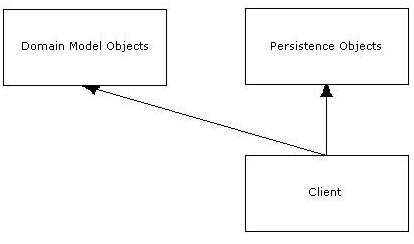
In the book Domain Driven Design Eric Evans encourages the use of Repositories. A repository is an object that is responsible for persistence and retrieval of Model or Business Objects. The intent of the repository is to abstract the object storage mechanism. The interface to a repository should not be specific to a database technology, or any technology being used to permanently store or 'persist' objects. This abstraction allows you to easily change the underlying storage technology. Adding support for a new storage technology (I.e. another relational DBMS), means creating another matching set of repository objects.


Multiple Assemblies


With this in mind, I decided to create 2 assemblies to match the 2 layers. A Domain Model assembly and a Persistence assembly. The idea being that the persistence assembly could be dynamically loaded at runtime and thus chosen from a list of assemblies that support various DBMSes


After running FX Cop on my work, I tried adding the CLS Compliant flag to assembly.info to satisfy the FX Cop audit.


using System;
[assembly:CLSCompliant(true)]

The CLSCompliant attribute caused my Persistence assembly to fail on compilation, due to the fact that it referenced and returned types declared in another assembly. The other assembly was of course my Model assembly. This got me thinking...


Single Assembly


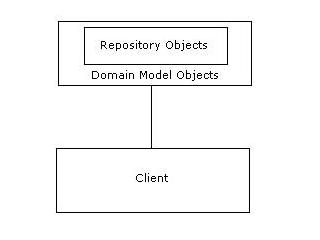
In other projects I have worked on, the persistence layer and model layer were combined in one assembly. The repository classes were included in a seperate namespace (and project sub-folder) and were therefore still distinct from the model objects. So logically the layers were seperate, but the physical implementation was a single assembly. The 2 layers worked very closely together and in many ways really acted like one layer. So this configuration also made sense.

The difficulty with the single assembly comes from the desire to 'swap' between persistence technologies. In the combined model, you can no longer load the repository objects you need at run-time. Supporting multiple database technologies requires the Domain assembly to contain multiple sets of repository objects collected in different namespaces, you would use the Strategy pattern to provide the runtime loading (abstraction from specific types), and some sort of controller to serve up the concrete repositories (based on a config setting perhaps). Each of the architectures has benefits and drawbacks. I like to reduce my assembly count though, and systems don't generally support a huge set of relational database technologies. So I think I will move my seperate assemblies into one. As the XP mantra goes, 'you aren't gonna need it' (Y.A.G.N.I.).

Friday, June 02, 2006

Application Specific Exception Classes

When should you create specialized exceptions in your C# application?

The .NET framework provides a few exceptions for use by applications, they are,


  • ApplicationException

  • ArgumentException

  • ArgumentNullException

  • ArgumentOutOfRangeException


and others...

These exception types are very useful and cover most cases. But they are usually not enough.
Let's say you have some special validation where arguments to a method have to 'jive'. Such as a ChangePassword method on a User object. The ChangePassword method takes maybe three arguments, oldPassword, newPassword and verifyNewPassword. The newPassword and verifyNewPassword arguments must match. You could just throw an ArgumentException and populate the message appropriately. This causes a potential issue since by raising a generic exception type you are forcing the caller to handle the exception in a generic way. If the caller wants to do something special for this error, it has to parse the error message. Not very nice.


Error Codes


The structured programming world employs error codes to relay the exception type. You could implement this in C# by defining a special exception type extended from Exception and include an integer ErrorCode property. Then assign every specific exception type a number using a series of enum types defined in the custom exception class. Use enumeration types to logically group exception types, and reduce the need to reserve blocks of numbers.


The error code solution works. However, imagine what the handler looks like from the caller's point of view. There is probably a switch statement of some kind. Not a very Object Oriented construct. In and Object Oriented design switch statements on enum codes do not belong. See Replace Type code with subclass. Enter Custom Exception Classes.


Custom Exception Classes


If you have error type codes, and you have switching logic on those codes, applying 'Replace Type Code with Subclass' will lead you down the path of custom exceptions. This essentially means creating a catalog of specialized exceptions derived from the Exception class in the System namespace.


Deciding what exception classes to create can be difficult. Over specialized classes could result in a huge and unwieldy group of exceptions. Under specialized classes are essentially meaningless. As in all object modelling, you identify classes to represent concepts in the domain. Exceptions are no exception(!) to this rule. Ask, what error condition concept you are trying to communicate. You might create an exception class to represent violation of an object relationship, or an exception to indicate an attempt to create a duplicate object. These classes would most likely include information regarding the objects involved, so as much information can be relayed to the user interface. Depending on the situation your exception classes may be more specific. For example, you may wish to express certain types of object relationship violation errors.


Be Agile


Attempt to model your exceptions based on the current need. Don't attempt to satisfy all possible scenarios. If you know how the caller will deal with the exception, model to that requirement. Extend later. If you find yourself tempted to add error numbers and switch on them - refactor to create exception classes.


It is somewhat painful to create exception classes properly. Run FxCop against your assembly and you'll see what I mean. If you are creating many exception classes it would be wise to create a codegen macro in VS, or at least have some code to copy/paste from to make it easier. You may also find yourself creating exception classes that add nothing. No additional data or methods, just a new type. I think this is OK, so long as you have catch statements for those exception types.

Friday, May 26, 2006

Handling the Browser 'Refresh' Button

When the user hits the 'refresh' button, the page resends the previous request to the server, which usually results in unexpected behavior* for web applications (*bugs).


One of the difficulties with building Web Applications is the fact that they are hosted within a 'browser'. The browser contains features that allow the user to customize their Internet browsing experience. On this note, it is EXTREMELY annoying when an application attempts to mess around with browser settings, it not threatening (in a securityish sort of way). So, in my opinion, disabling the refresh button is not an option! Besides, the user can always hit ctrl-r to get a browser refresh (and yes you could probably catch ctrl-r with javascript but that's not the point).


Response.Redirect


My current preferred method of dealing with the refresh button is to redirect back to the current page for all data modifying postback events. Something like the following,


Response.Redirect("Model.aspx");

where Model.aspx is the current page. It might not be a great idea to hardcode the page name (in case you want to change it). I've seen code where each page exposes a Url property. In this case the code would look like the following.

Response.Redirect(this.Url);

Placing these redirects in the event handlers ensures that if the user hits 'refresh' immediately after a data changing postback the event will not be re-fired. The refresh merely calls the redirect again (essentially) and reloads the page (as expected! how wonderful and easy too!).


Drawbacks


While the redirect method works, it is not without its difficulties. Remember, it is like a fresh navigation to the page, so it refires your "if( !Page.IsPostBack )" code. This can be a problem. Usually the "!IsPostBack" code populates list controls and re-running this code will cause current selections to be lost (very irritating for the user). Normally the ASP.NET Viewstate mechanism ensures the current selections on list controls are maintained through postbacks. My solution to the list selection problem is to store the current selection in Session and set the list selection manually.


Besides the extra management of Session variables, there is also the performance issue to consider. Each postback is now causing 2 hits to the server. Potentially calling into the database for data already displayed on the page. This seems like a high price to pay to deal with the 'refresh' button. Output caching may be a solution here...

Friday, May 19, 2006

Cost of Calling Methods in C#

What does a method call cost in C#? Should I use temps to reduce method calls?


In university, so many years ago, we learned that one of the most performance intensive operations was the method call. The professor explained the work required to create a stack frame, and move values into it, etc. Well... that was then, when maybe compilers weren't quite so efficient. Is this still true? What is the overhead when calling a method with a modern language like C#?


Why do I care about this?


Martin Fowler in his book Refactoring: Improving the Design of Existing Code, (which I am currently re-reading) describes several method creation refactorings, one of which is driven by the desire to remove temporary variables from a method (Replace Temp with Query). The motivation behind this refactoring is based on the idea that temporary variables encourage large methods and make refactoring difficult. Upon reading this refactoring I recalled the university lecture where we discussed the cost of calling methods and use of the C++ inline keyword (inline is a C++ compiler hint to not actually create a function and call it, but to generate inline code instead). In C++ 'inline' exists because function calls can be expensive. So I created a simple test to measure the overhead with method calls.


Method Call Overhead Results


Here is the code I wrote to measure the method call overhead, one method that simply does a calculation inline, and another that calls a function to do the calculation.


public class MethodCallCost
{
private int _iterations;
private int _valueA;
private int _valueB;

public MethodCallCost(int iterations, int valueA, int valueB)
{
_iterations = iterations;
_valueA = valueA;
_valueB = valueB;
}
public void MethodCall()
{
double temp = 0;
for( int i = 1; i < _iterations; i++ )
{
temp = CalculateAmount(_valueA, _valueB, i);
}
}
private double CalculateAmount(int valueA, int valueB, int divisor)
{
int result = valueA * valueB / divisor;
return result;
}
public void Inline()
{
double temp = 0;
for( int i = 1; i < _iterations; i++ )
{
temp = _valueA * _valueB / i;
}
}
}


I created the MethodCallCost object to run 3,000,000 iterations. Here are some results,


Method Call (Ms)Inline (Ms)
9347
11047
9363
9462
9462
9447
9462
9447
10963
7862

So, my conclusion (with this simple and perhaps insufficient test) is that method calls are cheap. The benefits of the 'Replace Temp with Query' are probably worth it. Now of course you may have a complex method that calls a webservice, or into a database, and in that case of course it probably makes sense the store the result instead of requerying. There are still judgement calls to be made, but go ahead and create method calls, just remember to profile and tune.

Tuesday, May 16, 2006

UrlReferrer - Handle with Care

What page was the user on before this one? Hey! Reponse.UrlReferrer seems to have that information.


Ok, I'll admit I'm a little scared of this feature. It seems to undermine the atomicity of web requests. If I could trust it though, UrlReferrer would be extremely handy for a web app with sophisticated navigation. Imagine multiple ways to get to a screen (as any good app should allow), and the user hits the 'cancel' button, and magically is returned to the previous screen. After all, the user's natural expectation is to be returned to the screen they were just on isn't it?. Here's some code that does just that.


private void btnCancel_Click(object sender, System.EventArgs e)
{
if(Request.UrlReferrer != null)
Response.Redirect(Request.UrlReferrer.AbsoluteUri);
else
Response.Redirect("Dashboard.aspx");
}


This code ensures that the UrlReferrer HTTP Header is set, and if it is redirects the browser to the referrer page. Otherwise the user is sent to a default page. Note here, NUnitAsp doesn't set the UrlReferrer header hence my null check. But...


Postbacks


If the page posts back, the Url Referrer is set to the current page, and your navigation is now broken. You either have to store the referrer in the page load event for later use, or not put any postbacks in the page (danger! danger! you will probably forget about this and break your redirection). I don't know about you, but my pages post back a lot especially in their immature state.


Server.Transfer


You can't use Reponse.Redirect to navigat to pages that reference the UrlReferrer. Reponse.Redirect causes the browser to send a GET request for the new page. The subsequent requests, such a POST to go to another page, now have the Url Referrer of the current page because of the GET request made by Response.Redirect (or something like that, trace the packets and you'll see what I mean).


The more I write about it, the more convinced I am to avoid Url.Referrer. The design limitations to 'make it work' are extremely constraining and easy to forget. It doesn't work with NUNitAsp (important for me, anyway). I am also unsure of which browsers even support this header.


Alternatives


You can potentially change your navigation strategy and use the bread crumb trail approach. Just save a navigation tree in the user's Session. I have also had some success passing navigation information as URL Query parameters (I.e. page.aspx?PreviousPage=Main.aspx). UrlReferrer is a fragile construct, try to find another way.

Friday, May 12, 2006

Protected or Private?

As of late, I've been setting the access level on class properties to protected.


I was creating a class, and the protected keyword came up in intellisense and I paused to think. Maybe if a class inherits from this class it would be useful to have access to the member data of the class, the same goes for private methods, why not make them protected?


So, right now, I am generally going with 'protected' for all internal class stuff. Classes that I know will not be extended will have private members, I ensure to seal those classes.


I imagine that a truly carefully designed class has a mix of private, protected and public access levels, and that setting everything internal to 'protected' is a bit naive. but for now...

Wednesday, May 10, 2006

OleDbCommand Parameters - Order Matters

Having trouble with your MS Access Update statement? Check your parameter order.


So I've written a small parameterized Update statement to create an OleDbCommand.
I was surprised to find that my Update command was returning 0 rows updated. Everything looks fine on inspection, so I pull the command into MS Access and replace the parameters with the specified values and it works fine. My code looks like this,


string sql = "UPDATE tblMemberVehicle SET MemberId=@MemberId, VehicleTypeId=@VehicleTypeId, Identifier=@Identifier WHERE Id=@Id";

OleDbCommand dbCommand = new OleDbCommand(sql, conn );

dbCommand.Parameters.Add("@Id", OleDbType.Integer).Value = vehicle.Id;

dbCommand.Parameters.Add("@MemberId", OleDbType.Integer).Value = vehicle.User.Id;

dbCommand.Parameters.Add("@VehicleTypeId", OleDbType.Integer).Value = vehicle.VehicleType.Id;

dbCommand.Parameters.Add("@Identifier", OleDbType.VarChar).Value = vehicle.Identifier;

Parameter names all match nicely, no exceptions from the database. I check the rows updated after running my ExecuteNonQuery statement, and always - 0 rows updated.


I have another update statement which is working, so I take a quick look at it. Lo and behold, the @Id was the last parameter added, and it corresponds with the parameter order as it appears in the SQL statement. Could it be that OleDbCommand works just like OdbcCommand and requires parameters specified in the SQL specified order? I begin to suspect that the parameter names are actually meaningless and conduct a small experiment. I change the parameter names to nonsensical names and leave the sql parameter names alone.


string sql = "UPDATE tblMemberVehicle SET MemberId=@MemberId, VehicleTypeId=@VehicleTypeId, Identifier=@Identifier WHERE Id=@Id";

OleDbCommand dbCommand = new OleDbCommand(sql, conn );

dbCommand.Parameters.Add("@Foo", OleDbType.Integer).Value = vehicle.User.Id;

dbCommand.Parameters.Add("@Bar", OleDbType.Integer).Value = vehicle.VehicleType.Id;

dbCommand.Parameters.Add("@Try", OleDbType.VarChar).Value = vehicle.Identifier;

dbCommand.Parameters.Add("@This", OleDbType.Integer).Value = vehicle.Id;

Any guesses as to what happens? Surprise, surprise, this code works. The parameter names are truly meaningless, well against MS Access anyway. I believe SQL Server respects these parameter names and actually uses them.


And all this time I've been sooo careful about my parameter names, sigh.

Monday, May 08, 2006

Returning Null Objects

What does it 'mean' when a method call returns a Null object?


I believe you must define interfaces very carefully. Firstly, because once an interface is in use it is difficult to change later. Second, because every method name, parameter, output is part of the description of what the interface does. The interface 'expresses' a mental model to the developer using it. It explains how the library works, or presents a mental model that can be used to apply the library effectively. The interface tells the developer how the library 'works', so while the code only deals with inputs and outputs, we developers use interface I/O to fabricate an understanding of what's happening under the covers. It is therefore important to specify an interface carefully. So, with that in mind, I propose a few instances where it makes sense to return a Null object from a method.


Errors


If you are not using exceptions to relay errors, or unexpected system conditions, and you are instead setting a global or passed-in error structure, your method should return a Null object reference. You don't want the processing to continue as if nothing was wrong. In the case of an error, the application should proceed into recovery mode. Oh look, I got a Null, something bad must have happened. I can either check the error structure and avoid using the Null object, or I can ignore the error structure and get an Null Object exception (No! Bad programmer!).


Object not found


In many cases I have returned Null from a 'find' or 'get' method when it was unable to retrieve a requested object. While it is necessary to check the return value for Null in these cases, the implementation is simple. A Null object is sometimes even acceptable, as it forms an input to another method which allows a null parameter. I am still in favor of this use of Null object references. After all the database supports the concept of Null too.


Null Object Pattern


The Null Object Pattern entails essentially 'stubbing' out methods and creating an indistiguishable object from the real object. The client object can use the Null object as it would the real thing, and no unpleasant Null checks are required.
I believe the Null Object Pattern is only useful for stubbing out code, where the object's behavior is not important to the client object. Maybe I can stub out the application logging object for example. If I haven't configured my logging, the logging system returns a Null logging object that doesn't fail on the log call, but does nothing. I can't however, stub out the Math object from which I am expecting performance of important calculations. It seems that I would be at risk of introducing difficult to find bugs, I would rather get an 'object reference not set' exception than a series of zeroes displayed in a report.


Empty List or Null


If my method returns a list of objects, and there are no objects to return, it makes sense to me to return an empty list. See Tor Norbye's blog post on this. You certainly can't return either Null or empty list and ascribe the same meaning to both, they're two different things. Empty list is easy, no objects found. Null? That just means an error to me, like the object wasn't properly initialized or something.

Tuesday, May 02, 2006

Repository Create Pattern

I'm working on creating a new object creation pattern. This new pattern is an elegant solution that fits within the Repository pattern described in Domain Driven Development by Eric Evans. I'm trying to ensure the following constraints in my application,


  • Objects are valid at all times

  • An Entity object without an identifier (db key) is invalid

  • Don't want to have to use GUIDs as identifiers

  • Objects that cannot be saved (because of their state) are invalid


Essentially, if an object exists I must be able to save it without getting constraint errors from the database.


Introducing 'Repository Create'


The Repository Create pattern works a lot like the factory patterns. You create objects through the repository. 'Entity' objects (objects that must be persisted) must all be created by a repository. That repository ensures uniqueness of business keys (if there are any) and applies an id to the new object. Any errors creating this new object and 'no object for you!'. The application never has partially formed, or duplicate objects floating around.


What about updates? Model objects should not permit updating of their keys. Simple. But what if I modify a property and thus make it a duplicate? You shouldn't be able to do this. Properties that are part of the uniqueness constraint must be modified through the repository, by a repository Update method.

An Example


Let's say I'm writing a project management application and I have a 'Project' object. The Project object must have a unique name so users can identify it, but that name can change too.


I simply create my project objects by calling 'create' and passing the project name to my project repository.

Project p = projectRepository.Create("Project 1");
If the name Project 1 is a duplicate I get an exception from the repository. If not, I get a new Project object, with a valid database Id and I am assured the name is not duplicated. Updating the name would look something like this
pRep.Update(p, "Project One");
Access to the project name has to be restricted either by using the C# internal keyword or Interface casting* (*A slippery way to implement 'friends' in C#).


This is the Repository Create pattern in a nutshell. It seems to be working fairly well so far, of course my requirements have also been fairly simple and I haven't had to do much optimization. More to come on this pattern...

Sunday, April 30, 2006

Apply a Default Sort Order

Always sort your object lists


I tend to get pretty lazy with my coding sometimes. My TODOs occasionally require more typing than it would take to actually do the TODO (I sometimes get lazy with the thinking part). So why would I recommend* (*insist on) sorting every list of objects in your system? Two reasons.


  • It makes testing a whole lot easier

  • You're less likely to have an unsorted list of items appear in your GUI


I have only just started doing this with my code* (* I may post a more educated and experienced blog later which includes the phrase 'it depends' when talking about when to sort lists) and it seems to be paying of so far.


Writing Tests on Sorted Lists


In the past I would put together a small 'IsInList' method to test that an object was in a list. Or I would create a 'GetObjectInList' to get an object and test it for expected values. The fact that the objects were stored in a random order of course made this necessary. The unsorted nature of the lists also meant the search had to be sequential which seemed amateurish (the performance implications were negligible since the lists were tiny, but...).

In any event, the nice thing about using a database is the ease of adding sorting. With a simple ORDER BY in MS Access I can sort on any column ascending or descending. Very little code. The .Net Framework also provides some simple and powerful ways to sort lists. Sorting my lists makes testing easier since object location is predictable. Testing is all about ensuring predictability anyway, right?


Your GUI lists should have default sort orders


If you have object lists and a GUI, you probably have list controls. I'll bet users are expecting data in those lists to be sorted either according to a scheme of their choosing, or in a commonly expected order. Ah, but if you use a layered design* (*like most kind-hearted developers) the question here becomes... where should sort logic exist? In the presentation layer or in the business model? I prefer a thin* (*super thin) presentation layer, the only code in the presentation layer should deal with form and page controls. I suggest then, that sorting objects is the responsibility of the model and is a business rule. Sorting is part of the analysis of data, like calculations. Testing logic in the GUI is also more difficult, so move as much logic as possible into to the model layer. If you are consciously sorting your object lists and your tests are checking this, there is very little chance of a nasty unsorted list control bug appearing in your gui (this happened to me once, and was caught by a customer! egad.)


The .Net Framework offers some powerful sorting tools namely the IComparable interface, and Comparer objects. These two tools give you unlimited sorting power, easily and elegantly.